Squishy Magic: ASMR Toy Maker
- 4.6
- Rating
- 10.00M
- Installs
- Free
- Price

 Analysis by App-foxy
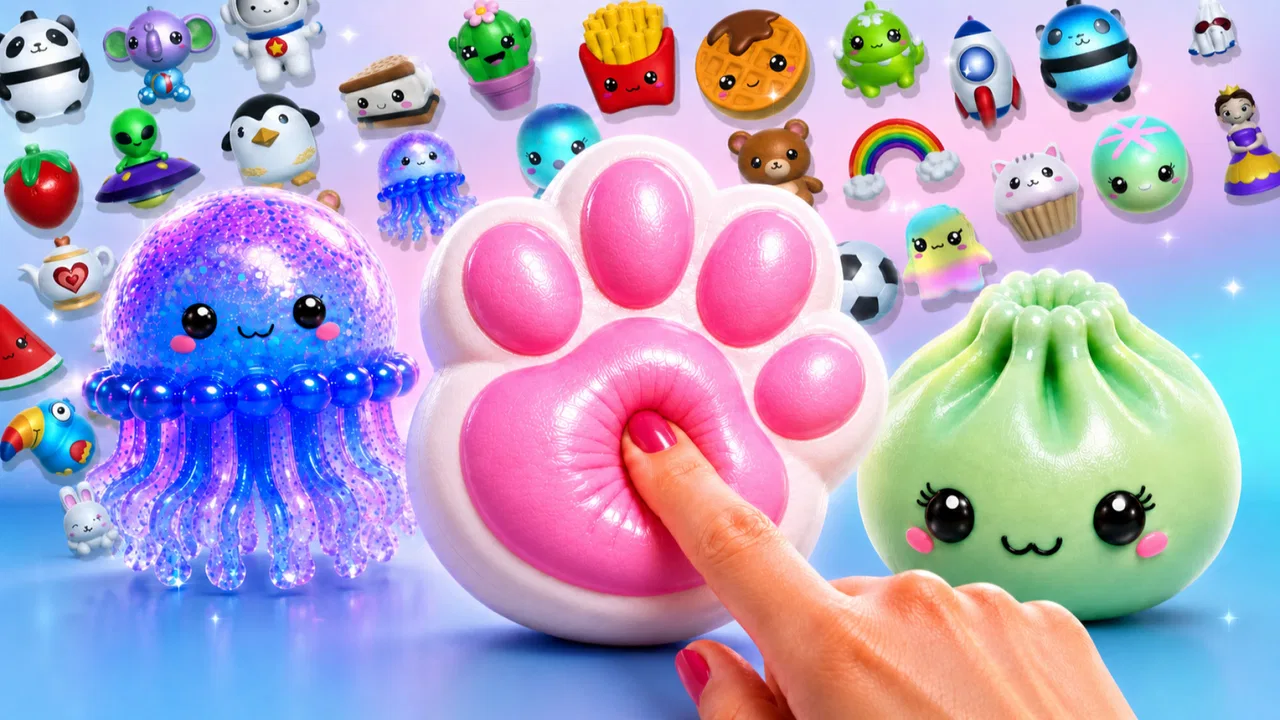
Squishy Magic: 3D Toy Coloring is the kind of game I open when I want something gentle, colorful, and completely free of pressure. Instead of asking me to win battles or beat a timer, it lets me create, color, and collect soft-looking three-dimensional toys. That simple idea makes it a particularly easy recommendation for children, casual players, and anyone who enjoys relaxing creative activities on a phone.
I found the appeal less in a complicated challenge and more in the small routine of choosing a toy, changing its appearance, and seeing a collection gradually take shape. The game comes from Dramaton and sits in the educational category, although I would describe its learning value as informal rather than academic. It encourages color recognition, visual choices, patience, and creative experimentation without presenting itself like a lesson.
The best way to understand this game is as a calming digital craft activity, not as a traditional toy-collecting adventure. That distinction matters. If you want deep progression, a story, or demanding puzzles, this will probably feel too light. If you want a friendly activity for a short break, it has a much better chance of fitting your routine.
You May Also Like

 AccuWeather: Weather Radar
AccuWeather Review: A Quick, Clear Forecast for Everyday Decisions
For everyday plans, the best forecast is the one you can understand quickly. AccuWeather makes rain timing, radar, and local conditions easy to act on, with a few trade-offs.

 Hill Climb Racing
Why Hill Climb Racing Still Turns Crashes Into One More Run
A tiny car, a bumpy hill and one more upgrade: Hill Climb Racing keeps resurfacing because its simple chaos makes every near-miss feel personal.

 AliExpress - Shopping App
AliExpress Makes Global Shopping Feel Personal, but Shoppers Bear the Risk
AliExpress turns a global marketplace into a pocket-sized discovery engine. Its reach is useful, its shopping loop compelling, and its trade-offs easy to miss.

 Lords Mobile: Kingdom Wars
Lords Mobile Is a Kingdom-Building Routine, Not a Quick Match
A case-by-case verdict on the building, battles, device demands, and social commitments that make Lords Mobile rewarding for some players and exhausting for others.

 PDF Scanner app - TapScanner
TapScanner Makes Paperwork Easier to Capture, Check, and Share
TapScanner makes scanning with a phone feel less like a rescue operation and more like a dependable step in getting work done. Its capture tools are useful, though not flawless.

 Block Blast!
 Shows How Much a Puzzle Game Can Leave Out
A quiet grid game shows why puzzle players increasingly value instant clarity, repeatable skill and low-pressure play—and where the genre still needs to catch up.
More From Our News Desk
View All News


How the current version feels to use
The current version is 6.81, and my overall impression is that Squishy Magic: 3D Toy Coloring has reached a mature, straightforward form. The basic loop is easy to understand almost immediately: select a cute three-dimensional object, work on its color and appearance, then keep it as part of a personal collection. There is no need to study a long tutorial before getting started, which is important for younger players and for adults who simply want a few quiet minutes.
The three-dimensional presentation gives the coloring more personality than a flat coloring book. A toy feels like an object rather than a page, so rotating attention around its shape changes how I think about the design. Rounded surfaces, small details, and different sections invite slightly different choices. Even when the activity is simple, the result feels more like decorating a miniature object than filling in a picture.
I also like that the game does not require a competitive mindset. A child can choose bright colors, repeat a favorite combination, or make something deliberately unusual without being told that the result is wrong. For adults, that freedom makes it useful as a short decompression activity after work or while waiting somewhere. It is not a replacement for a full creative tool, but it is much less demanding than one.
The audience is broad. The content rating is Everyone, so families looking for an accessible creative game will find the presentation approachable. I would still suggest that parents look at the purchase settings before handing over a device, because the free download includes optional in-app purchases ranging from $0.99 to $23.99 per item. The age rating describes the content, not the spending decisions a child might make.
A small session can be more satisfying than a long one
One practical strength is how naturally the game fits into short sessions. I can imagine a child using it for a few minutes before moving to another activity, or an adult opening it during a commute break without needing to remember a complicated objective. The design works best when treated as a series of tiny creative moments rather than a game that demands a long uninterrupted sitting.
A realistic everyday use case would be a parent giving a child a tablet while preparing dinner. The child can focus on choosing colors and decorating a toy, while the parent knows the activity is quieter and more constructive than many action-oriented games. It would not replace supervision, especially where purchases are concerned, but the low-pressure format is much easier to fit into that kind of household moment.
I found that choosing a theme before touching the screen makes the experience more enjoyable. For example, deciding on a candy-colored set, a cool blue palette, or a deliberately mismatched design gives the session a small creative goal. Without that personal rule, the actions can become repetitive quickly. This is one of the game’s hidden trade-offs: it supplies the canvas and the objects, but much of the imagination has to come from the player.
What the developer’s ongoing work means
Dramaton released the game on December 19, 2019, and the version number now identifies it as an established product rather than a brand-new experiment. I would not read the version alone as proof that every part has been transformed, but it does suggest a game that has continued through multiple stages of maintenance and refinement. For someone deciding whether to try it today, that history is more reassuring than a freshly launched app with no visible track record.
The audience size also gives some context. Squishy Magic: 3D Toy Coloring has passed 10 million installs, with an average rating of 4.6 from roughly 126 thousand ratings and about 14 thousand written reviews. Those figures do not guarantee that every player will enjoy the same style of play, but they show that the concept has connected with a large audience and that many people have taken the time to evaluate it.
When I think about product evolution here, I focus on the practical result rather than assuming specific updates. The current experience is polished enough to explain itself, familiar enough for returning players to pick up again, and broad enough to serve both children and casual adults. I would be cautious about expecting a completely different game from future updates, though. The central identity is clear, and its strength comes from keeping the activity uncomplicated.
For existing users, that stability can be a benefit. A child who enjoyed the game before does not have to relearn an entirely new format just to continue coloring. Parents can also return to it without worrying that the basic purpose has disappeared under layers of competitive systems. The trade-off is that players hoping for a major change of pace may find the core loop remains intentionally familiar.
Useful habits for getting more from the coloring loop
My first tip is to treat the collection as a design project instead of a checklist. Give several toys a shared color idea, such as warm shades for one group and cooler shades for another. This makes the collecting side feel more meaningful because the objects begin to look connected. It also adds a little structure for children who enjoy sorting and grouping but do not need a formal puzzle.
My second tip is to slow down at the beginning of a design. The temptation is to tap quickly through every available color, but the three-dimensional form is easier to appreciate when I consider one section at a time. I usually pick a main color first, then add contrasting choices only where they help the shape stand out. That approach turns a very simple activity into a small exercise in visual planning.
A third useful approach is to use the game as a calm transition rather than a reward that must last a long time. A short coloring session before bedtime, after homework, or between errands can work well because the game does not demand intense concentration. I would avoid presenting it as a substitute for sleep or offline play, but its quiet rhythm makes it a better transition tool than a fast action game.
There is also a family opportunity here. A parent and child can each choose a toy and compare the creative decisions without treating one result as better than the other. Asking why a color was chosen encourages conversation and gives the educational label more substance. The game itself does not need to teach a formal concept for it to support observation, vocabulary, and decision-making.
Where it compares well with other casual creative games
Compared with a conventional coloring-book app, this game’s strongest difference is the sense of handling an object. The three-dimensional toys make the activity feel more tactile in spirit, even though it is still controlled through a screen. A flat coloring app may offer more room for detailed drawing, shading, or freehand expression, so I would choose that alternative for someone who wants to create pictures from scratch.
Compared with a standard collection game, Squishy Magic is much less demanding. There is no need to build a competitive team or master a complicated economy to enjoy the central activity. That makes it friendlier for younger players and people who dislike pressure. On the other hand, collection-focused games with stronger progression systems may provide a clearer long-term reason to return, while this one depends more on the pleasure of decorating.
It also differs from educational games built around quizzes or structured exercises. Those alternatives are better when a parent wants measurable practice in a specific subject. Here, the learning is softer: recognizing colors, making choices, noticing shapes, and staying engaged with a creative task. I would recommend it for open-ended play, not as a replacement for a reading, mathematics, or language-learning game.
The free price makes trying it easy, but optional purchases change the decision for families. I appreciate being able to start without paying, yet I would not call the full experience cost-free simply because the initial download is free. Anyone who dislikes purchase prompts should review device controls in advance. For adults using it alone, that may be a minor inconvenience; for children, it deserves deliberate handling.
Limitations that become clearer over time
The main weakness is repetition. The first few toys can feel charming because the format is new, but the actions involved are still variations on selecting, coloring, and collecting. Players who need constant novelty may lose interest sooner than children who enjoy repeating a familiar creative routine. I would describe this as a deliberate simplicity rather than a design failure, but it limits the game’s audience.
The experience also relies heavily on the player’s willingness to invent personal goals. There is a difference between freedom and depth: freedom lets me choose what to do, while depth gives those choices more consequences. This game offers the former more strongly than the latter. If you want every decision to unlock a new strategy or change a larger world, you should look elsewhere.
Another limitation is that the educational value should not be overstated. Coloring and collecting can support creative confidence and basic visual thinking, but the game is not a structured course. A parent expecting clear lessons, progress reports, or skill-based assessment may be disappointed. I see it as a playful supplement to other activities, not as an educational program in the strict sense.
The purchase model is the most important practical friction for families. The game is free to start, but individual in-app purchases can reach $23.99. I would set a purchase password or use the relevant parental controls before letting a child play independently. That advice is not a criticism of the coloring mechanics; it is simply the sensible way to manage a free-to-start game on a shared device.
Device compatibility is also worth checking before installation. The game requires Android 7.0 or later, so older Android phones and tablets may not be suitable. For users on a supported device, the more relevant question is whether the screen is comfortable for detailed tapping. A larger tablet display should make the toy designs easier for children to handle, while a small phone can still work for quick sessions.
Who should try it and who should skip it
I would recommend it to children who enjoy cute objects, color choices, and collecting without competition. It is also a good fit for parents seeking a calmer game format, provided purchases are managed. Adults who like digital fidget activities may find it pleasant when they want something visually engaging but mentally light.
I would be more hesitant to recommend it to players who expect a strong story, difficult puzzles, multiplayer interaction, or a deep creative editor. It is not the right choice for someone searching for a professional drawing tool either. A dedicated art app offers greater control, while a traditional game may provide more challenge and a stronger sense of progression.
Returning players should expect familiarity to be part of the appeal. The established version and large install base make it a comfortable choice for someone who wants a known, accessible activity, but I would not install it expecting a radical reinvention of the genre. New users should try the free starting experience first and decide whether the coloring loop itself is satisfying before considering any purchase.
What I would watch in future updates
If I were following the game’s development, I would watch for additions that deepen creativity without making the interface harder for children. More ways to organize a collection, clearer personal design goals, or gentle prompts that encourage experimentation could add lasting value while preserving the relaxed identity. The important balance would be giving players more to do without turning a soothing activity into a complicated management game.
I would also pay attention to how future versions handle the relationship between free content and optional purchases. A good experience should remain welcoming for someone who never spends money, especially because the game’s family-friendly appeal is one of its strongest qualities. Clear choices and sensible purchase boundaries matter as much as new toys when children are part of the audience.
For existing users, the ideal evolution would be additive rather than disruptive. New creative possibilities could give long-time players a reason to return, while the familiar coloring flow would remain available to younger or occasional users. I would not want the game to chase the complexity of a full collection RPG, because that would weaken the very simplicity that makes it approachable.
My final view is positive but specific: Squishy Magic: 3D Toy Coloring works best as a relaxing, accessible creative game with a playful educational edge. Its free entry, Everyone rating, and approachable three-dimensional toys make it easy to recommend for families and casual players. Just keep expectations realistic, manage in-app purchases carefully, and remember that its enjoyment comes from small decorating sessions rather than deep progression.
After trying it, I would suggest starting with a personal color theme, using the collection as a creative project, and judging the game by how pleasant its basic loop feels. If that simple act of shaping a cute toy helps you or your child unwind, the game has done its job. If you need challenge, detailed drawing, or structured learning, a more specialized alternative will serve you better.
FAQs for Squishy Magic: ASMR Toy Maker
01What is Squishy Magic: 3D Toy Coloring?
Squishy Magic: 3D Toy Coloring is an engaging app that lets users create and customize virtual squishy toys. With a wide range of colors, textures, and patterns, users can design unique 3D squishies. The app is popular for its realistic squishing effects and is available for both Android and iOS devices.
02Is Squishy Magic: 3D Toy Coloring free to use?
The app is free to download and offers a variety of features at no cost. However, it does include in-app purchases for additional features, colors, and designs. These optional purchases enhance the user experience but are not necessary to enjoy the app's core functionalities.
03What age group is Squishy Magic suitable for?
Squishy Magic: 3D Toy Coloring is designed for users of all ages, making it a family-friendly app. Its simple interface and creative features are particularly appealing to children and teens, but adults who enjoy stress-relief activities may also find it enjoyable.
04Are there any educational benefits to using Squishy Magic?
While primarily a creative and entertainment app, Squishy Magic can help develop fine motor skills and encourage artistic expression. Users can experiment with color theory and design, making it a subtle educational tool for younger users interested in art and creativity.
05Does Squishy Magic require an internet connection?
Squishy Magic: 3D Toy Coloring does not require a constant internet connection to function, allowing users to enjoy the app offline. However, an internet connection is needed to access certain features like in-app purchases, updates, and sharing creations on social media.
Pros
- Intuitive and easy-to-use interface.
- Wide variety of squishies to customize.
- Realistic textures enhance creativity.
- Frequent updates with new items.
- Suitable for all ages
- family-friendly.
Cons
- In-app purchases can become expensive.
- Limited offline functionality.
- Occasional ads disrupt gameplay.
- Requires a stable internet connection.
- Some items locked behind paywalls.

Squishy Magic: ASMR Toy Maker
Gallery